Brilliat Script: A Luxurious Touch for Web Design
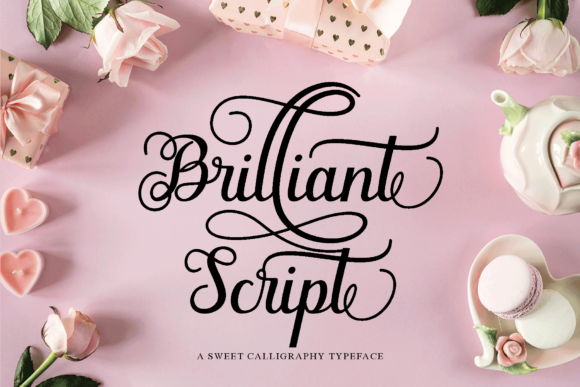
When I was redesigning a boutique online store, I knew the font had to feel as elegant as the products it showcased. After testing several options, I landed on Brilliat Script—a romantic and sweet calligraphy typeface that adds a luxury spark to any design project. Its characters dance along the baseline, creating a visual rhythm that feels both organic and refined.
Brilliat Script is part of the Script Amp collection, which offers a range of expressive script fonts tailored for digital use. As a web designer, I appreciate how it balances whimsy with professionalism, making it ideal for branding that wants to feel personal yet polished. It’s not just a font; it’s a design choice that tells a story.
Testing Brilliat Script in Real Layouts
I started by placing Brilliat Script in the hero section of the online store. The headline stood out against a soft background image, drawing attention without overwhelming the viewer. It worked especially well when paired with a simple sans serif for the body text, allowing the script font to shine as a decorative element rather than a distraction.
On mobile screens, I noticed that the font remained legible at larger sizes, but I avoided using it for body copy. Instead, I reserved it for headings, buttons, and short phrases where its elegance could be appreciated without compromising readability. For smaller elements like call-to-action buttons, I adjusted the spacing to ensure the letters didn’t feel cramped.
Using Brilliat Script in Different Digital Projects
Brilliat Script isn’t limited to e-commerce sites. I’ve used it on a coaching website to create a warm and inviting tone for the homepage. The font’s flowing lines gave the site a personal touch, making it feel more approachable. It also worked well for blog headers, where it added a sense of creativity without being too distracting.
For a product landing page, I experimented with using Brilliat Script over an image banner. The result was striking—its curves complemented the visuals and created a cohesive aesthetic. However, I made sure to keep the text contrast high, using a dark overlay to maintain clarity on light backgrounds.
Readability and User Experience Considerations
One of the key things to consider when using a script font like Brilliat Script is its impact on readability. While it’s beautiful, it’s not always the best choice for long paragraphs. I recommend using it sparingly and ensuring there’s enough white space around the text to prevent visual clutter.
On dark backgrounds, Brilliat Script retained its charm, but I found that slightly increasing the line height improved the reading experience. For fast-loading visual content, I made sure the font was optimized for web use, avoiding any unnecessary file sizes that could slow down the site.
Font Pairing and Design Consistency
Pairing Brilliat Script with a clean, modern sans serif helped balance the design and maintain visual hierarchy. This combination worked well for both desktop and mobile layouts, ensuring that the overall look remained consistent across devices.
When working on a digital brand kit, I used Brilliat Script for logo design and social media graphics. Its unique style made the brand feel more distinctive, while the accompanying sans serif provided a solid foundation for other design elements. This pairing also helped reinforce the brand’s identity across different platforms.
Practical Tips for Using Brilliat Script
If you’re considering using Brilliat Script for your next project, start by checking the available styles and weights. Some script fonts can have multiple alternates or ligatures, which can add variety and depth to your design. Make sure the font supports the languages you need, especially if your audience is global.
Also, verify that the font is available as a webfont so you can easily integrate it into your site. Commercial licensing is another important factor—ensure you have the right to use the font for your specific project, whether it’s for a client or your own business.
Ultimately, Brilliat Script is a versatile tool for web designers looking to add a touch of elegance to their projects. Whether you're working on a creative portfolio, an online shop, or a course sales page, this font can elevate the visual appeal of your site while maintaining a professional edge.